The Azure Landing Zone for SAP
Whitepaper | SAP | Azure | Cloud Architecture | Landing Zone
Part 3 of a 4-part series on SAP Landing Zones in the cloud. Part 1 covers why this still matters and the seven-attribute framework this Part applies concretely. Client details anonymised: a telecommunications provider migrating SAP BW/BI and ECC from a Singapore data centre to Azure Sydney.
Abstract
This paper applies the series' seven-attribute framework to Azure, using a real SAP BW/BI and ECC migration from Singapore to Azure Sydney as evidence throughout. It covers the real Management Group hierarchy and how the Corp/Online split enforces the DMZ argument at the subscription level; a Virtual WAN network topology split by tier rather than by region, plus six real lessons from the field — data migration bandwidth constraints, network team friction, iterative firewall negotiation, and access segmentation; a disaster recovery section that's as much about documentation drift as architecture, since several designed controls (ASCS/ERS clustering, HANA clustering, AD replication) were never actually implemented and the landing zone diagrams were never updated to reflect it; and the identity, security, governance, and cost mechanisms that complete the picture, including Azure's genuinely different answer to the ransomware-resilience question Part 2 raised with ICE storage.
Part 1 laid out seven attributes every SAP landing zone needs to answer. Part 2 showed what a real answer looks like on AWS. This Part asks the same seven questions of Azure — same discipline, different platform, and in places, a genuinely different governance philosophy under a similar-looking surface.
One framing note: Microsoft's own SAP landing zone guidance [1] groups into five design areas, not seven — identity, network, business continuity/DR, security-governance-compliance combined, and platform automation. This Part keeps the series' seven-attribute structure for consistency, flagging where Microsoft's grouping differs rather than forcing a false match.
Scope, and an honest note on evidence: SAP BW/BI (dev/test/prod) and ECC (production only, kept as a reference system post-S/4HANA migration elsewhere) migrated from Singapore to Azure Sydney, into an already-established landing zone rather than one designed from scratch here. One aside worth a sentence: the source ECC database moved from Linux/Oracle to Windows/MS-SQL during migration after an Oracle licensing dispute — Oracle pushed what's now marketed as Oracle Database@Azure [2] as an alternative — the author was engaged directly to build that Exadata solution, though it never proceeded because the client never confirmed it commercially. Vendor licensing pressure at a migration inflection point isn't uniquely SAP's game, as Part 1 argued.
Account structure
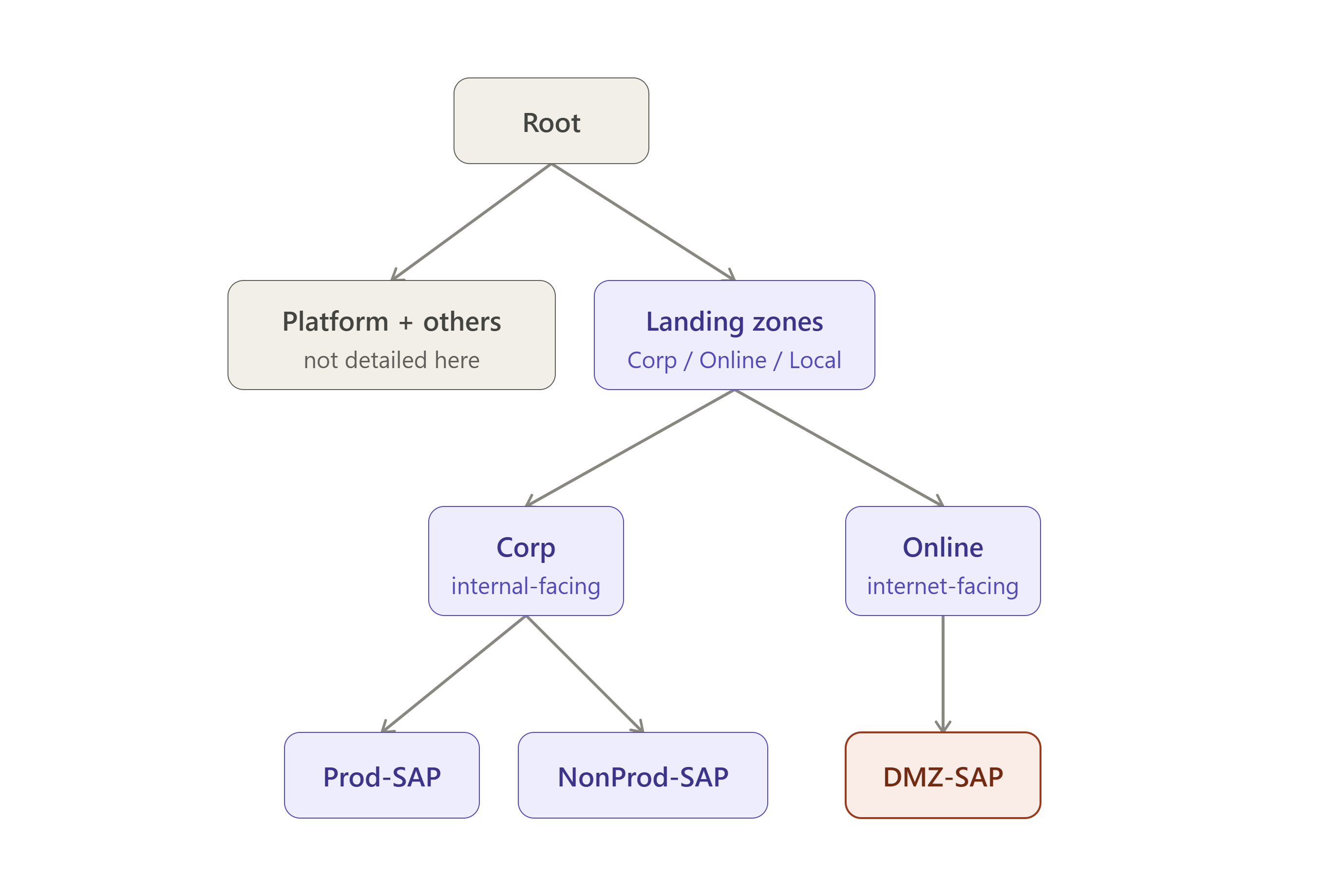
Azure's equivalent of AWS Organizations is the Management Group hierarchy [3], subscriptions instead of accounts as the isolation boundary.
| Microsoft's generic reference | This build | |
|---|---|---|
| Platform branches | Security, Management, Identity, Connectivity | Identity, Management, Connectivity — no separate Security branch |
| Workload grouping | Landing zones MG → Corp / Online / Local | Same Corp/Online split, used deliberately for SAP |
| Decommissioned / Sandbox | Both present as siblings | Same |
The right shape depends on how many workload categories an organisation actually manages, not on matching a diagram — a legitimate variation, not a deviation.
The Corp/Online split is the strongest real-world evidence in this series for the DMZ argument. Corp splits into Prod/NonProd, each with a dedicated Corp-{env}-SAP subscription feeding SAP-prod-subs / SAP-nonprod-subs — while Online contains its own Online-dmz-SAP branch, feeding a distinct SAP-dmz-subs subscription entirely separate from Corp. SAP's core workload sits under Corp; its internet-facing DMZ components get their own subscription under Online.
Resource groups follow rg-sap-{environment}-{purpose}-{svc|wkld}-01, platform tooling kept separate from workload resources within every environment. Three subscriptions existed — SAP NonProd, SAP Prod, SAP DMZ — with DMZ's resource groups still a future placeholder at the point captured, while NonProd and Prod were both fully live: designing the target state and implementing in phases. Every subscription also carries a repeatable governance stamp — Cost management, Role assignment, Policy assignment, Network Watcher, Defender for Cloud — the same "every account gets the baseline from day one" argument as Part 2.
Where this genuinely differs from Part 2's AWS pattern: Azure has no single subscription playing ICE storage's exact role, but an equivalent control stack achieves the same trust-isolation goal differently [4] [5] [6] — worth featuring as Azure's real answer, not a gap.
| Control | What it does |
|---|---|
| Immutable + locked Recovery Services vaults | Once locked, no one — including a compromised global admin — can delete or shorten retention on existing backups |
| Multi-User Authorization (Azure Resource Guard) | Sits in a separate, isolated subscription; disabling backup or reducing retention requires approval from an admin with no other access to that vault's subscription |
| RBAC separation | Backup administrators kept distinct from workload administrators |
| Soft Delete + Cross-Region Restore | 14-day recoverability window, plus geo-redundant restore from a paired region |
Together, arguably a more mature, defense-in-depth answer to the exact failure mode behind the ransomware recovery told elsewhere in this series than a single isolated account would be alone.
Network topology
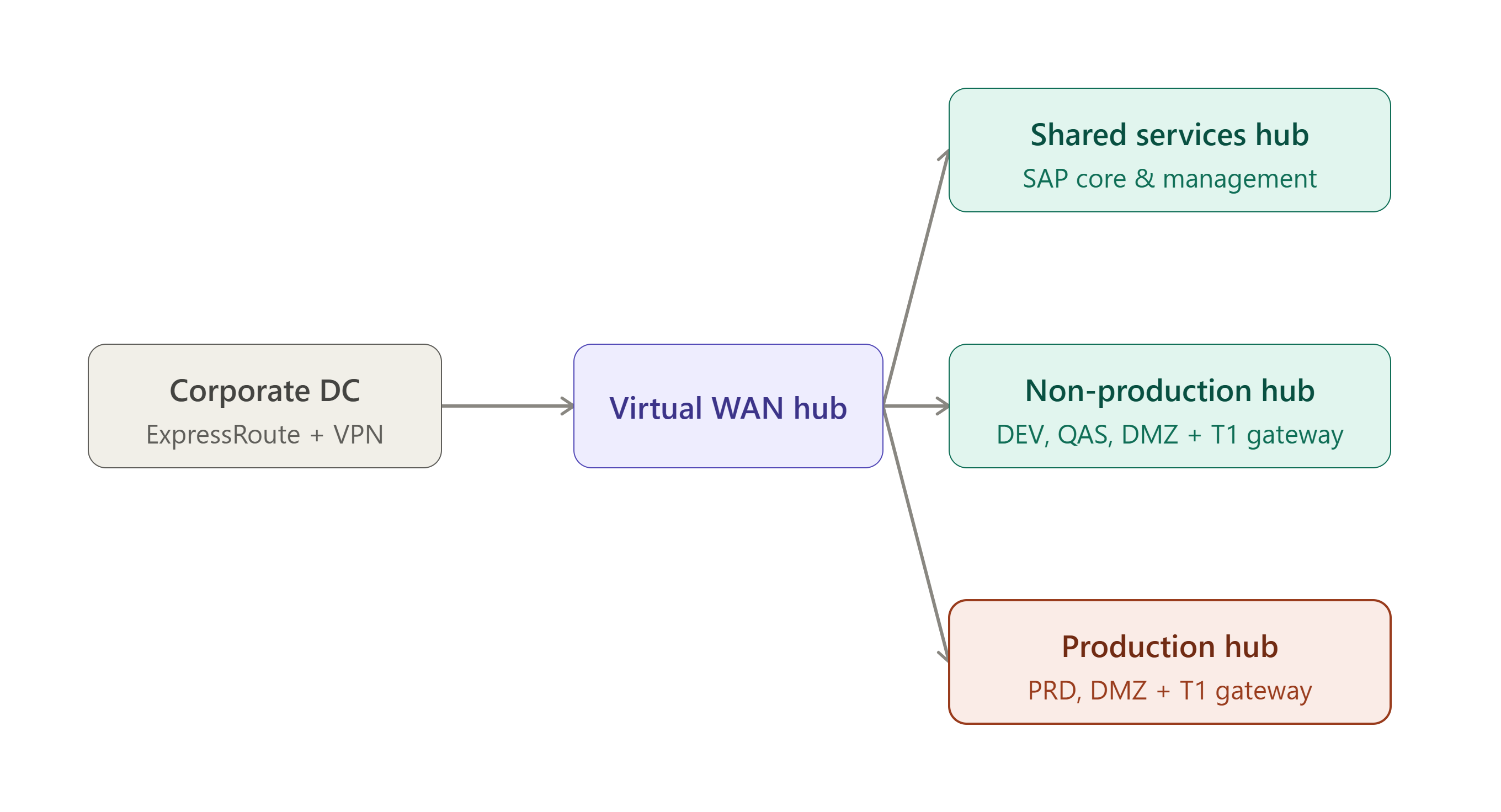
The real network runs on Azure Virtual WAN, not classic hub-spoke — a correction to what Microsoft's generic SAP diagram shows.
| Hub / VNet | Purpose | Key detail |
|---|---|---|
| Corporate DC connectivity | Hybrid link | ExpressRoute + site-to-site VPN, both to the Virtual WAN hub |
| Shared Services hub | Cross-tier services | Peered to SAP Core & Management subnet |
| Non-Production hub | Non-prod traffic | Peers to DEV, QAS, and NonProd DMZ VNets; own dedicated T1 gateway VNet |
| Production hub | Prod traffic | Peers to PRD and PRD DMZ VNets; own dedicated T1 gateway VNet |
| SAP VNet subnets | Web / Application / Database | Web Dispatcher, SAP Central Services + app servers + zone-redundant storage, SAP DB — same three-tier split as Part 2, achieved at subnet level rather than separate VPCs |
Since this was single-region, "one hub per region" doesn't apply — hubs split by tier instead, an equally legitimate pattern short of multi-region. DMZ is confirmed at the network layer, not just the subscription layer: NonProd DMZ and Production DMZ are separate VNets from DEV/QAS and PRD. Azure Bastion sits in the hub alongside Azure Firewall. MSP access is restricted to specific ports, specific tool IPs, and nominated consultants' RDP to jump hosts only, with an explicit rule that no workload connectivity from the MSP is allowed.
Four real lessons this network had to absorb:
| Issue | What happened |
|---|---|
| Data migration bandwidth | On-premises link bandwidth ruled out HANA System Replication as the migration mechanism; Azure Data Box was discarded too — shipping time would have blown the cutover window. What worked: GPG-encrypted export files, two internet hops (internal → DMZ → target), landing in Blob storage via robocopy, access locked to the source proxy's single public IP. Not elegant on paper, but real and effective — the theoretically "correct" replication tool isn't always the one that fits the actual link you have. |
| Network team engagement | The client's network team retained control, shared limited detail, and was hard to engage — they built the network and DNS zones directly. Reverse DNS lookups, which SAP requires, hadn't been configured before and took a few iterations. |
| Internet access | Negotiated iteratively — a base allowlist, then chasing every subsequent failure one at a time, including endpoints Azure Backup itself required but weren't on the initial list. |
| Access and segmentation | NetScaler fronted both end-user access ahead of SAP's own Web Dispatcher, and external access at the OS layer. System-to-system traffic between SAP and partner networks crossed multiple firewalls across segmented zones — every new integration re-litigated that path. The same segmentation the DMZ argument depends on isn't free; budget for that ongoing overhead. |
DR and resilience
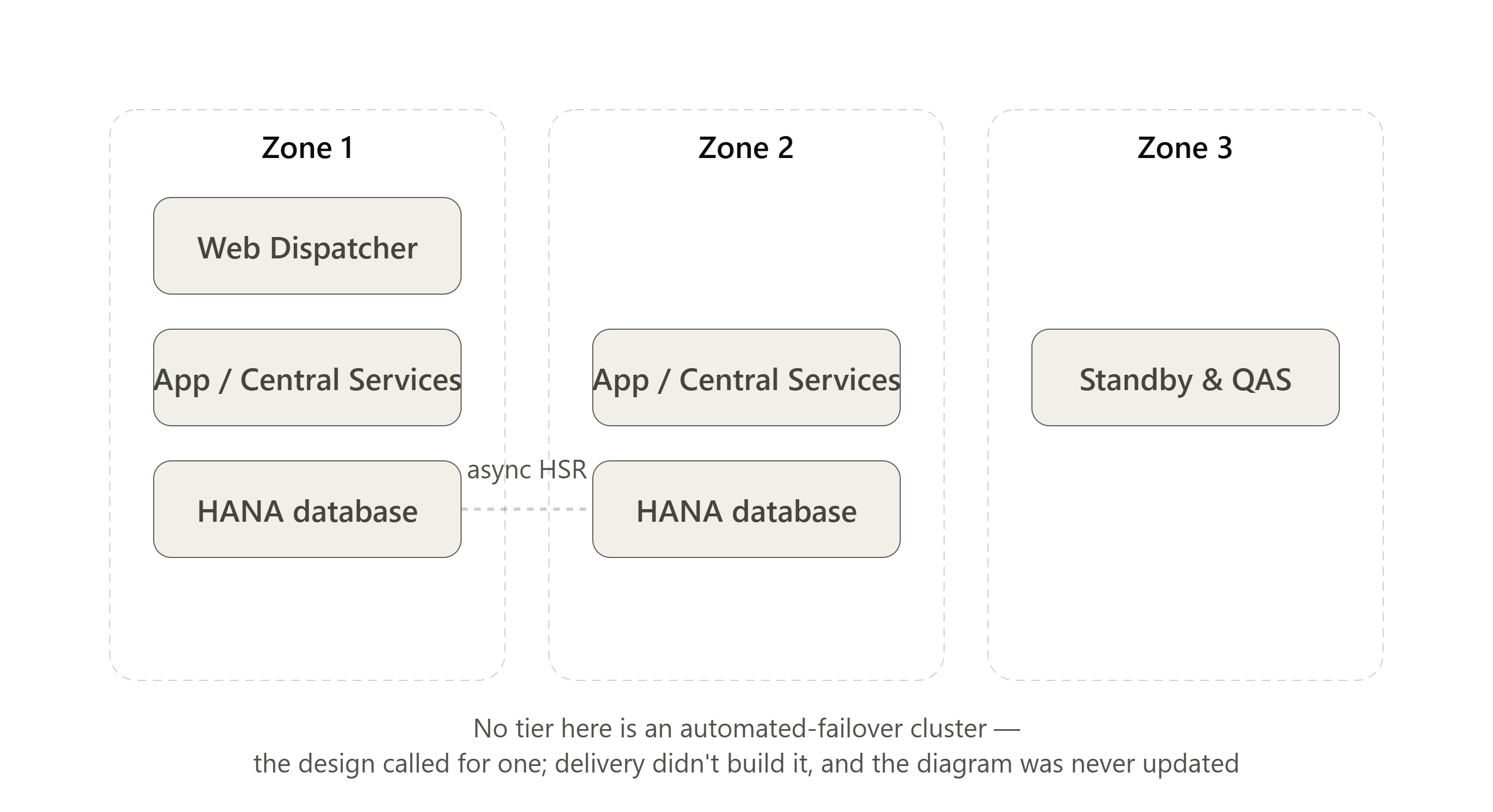
This closes the loop on the one item most worth verifying before writing about it — and it's worth being precise about what "closes the loop" actually means here, because the reference design and what shipped aren't the same thing. The SAP spoke VNet spans three Availability Zones, with Proximity Placement Groups grouping VMs for latency-aware placement, and Zone 3 carrying standby and QAS capacity — that part matches the design. What doesn't: Central Services and app servers span Zones 1–2, but the Pacemaker-pattern ASCS/ERS cluster the reference design calls for was never implemented. The database tier tells the same story — two separate HANA servers, one per zone, connected by asynchronous HSR, but not managed as an automated-failover cluster either; failover here would be manual, not automatic.
Worth naming plainly: these weren't oversights caught later, they were real decisions made during delivery — and the landing zone design documentation was never updated to reflect them. A landing zone diagram that stops matching what's actually running is worse than no diagram at all, because it tells the next person a story that isn't true.
The AWS parallel is precise, not approximate: Microsoft's SAP DR guidance [7] splits by layer exactly as the AWS build did — Azure Site Recovery handles application-tier VM replication; database-tier replication uses native DBMS features (HSR, SQL Always On) instead of ASR. The same split as Part 2's AMI/EBS app-tier recovery paired with HSR database recovery.
| Design choice | What Microsoft's guidance says |
|---|---|
| Region pairing | Default paired regions don't guarantee matching VM families — many organisations choose DR regions by required VM type instead |
| Storage replication | Standard storage replicates between paired regions; databases and VHDs can't rely on that — native DBMS replication is required |
| Deployment pattern | Three options: prod-only in primary with DR as standby; non-prod in the DR region doubling as DR capacity (most common); or all SAP in primary with DR purely for failover |
| ExpressRoute | At least one circuit to primary, others to the DR region — protects connectivity if a catastrophe hits one region's network access specifically |
| HA/DR latency | Per SAP Note 1100926, app-to-database round-trip must stay ≤ ~0.3ms when combining HA and DR in one region |
The immutable-vault and Multi-User-Authorization stack from Account structure belongs here too: a DR plan that restores a compromised backup because nothing stopped the attacker deleting or shortening retention isn't a DR plan, it's a delayed version of the same incident.
Identity and access
Entra ID is the federation layer; Privileged Identity Management provides just-in-time elevated access — the closest equivalent to least-privilege-by-default. The break-glass pattern, confirmed from Microsoft's emergency-access documentation [8]: two or more accounts, in a dedicated security group excluded from any Conditional Access policy that could block sign-in, since an account subject to MFA or a compliant-device requirement might be unusable during the exact scenario it exists for. Quarterly sign-in testing is a named best practice.
The Windows fleet's AD pattern is where Microsoft's reference architecture and reality parted ways. Microsoft's SAP reference shows a dedicated Identity subscription hosting actual AD Domain Controllers as VMs, one set per region, each with a Recovery Services vault — self-managed AD-on-IaaS as the primary pattern, not Azure AD DS by default. In this build, that recommendation wasn't followed: AD wasn't replicated into Azure at all, despite it being the strongly recommended pattern — every Windows server referred back to the on-premises AD domain controllers directly. Worth naming as a real design-vs-delivery gap, not a footnote: it's the kind of decision that looks reasonable under deadline pressure and becomes a latency or availability dependency on the on-premises link later.
Worth naming plainly, since the clean PIM/break-glass theory is only half the story: getting privileged production access, for both build and operations, through the client's existing PAM process was real friction — procedurally complex and genuinely difficult regardless of how clean the access model looks on a diagram. An existing PAM process doesn't automatically flex to a new landing zone's access model; budget real time for that negotiation.
Security baseline
Microsoft's native stack covers posture, threat detection, and key management, but this build layered a third-party tool on top for vulnerability management specifically: a Tenable/Nessus agent was deployed on every server, and reported vulnerabilities were tracked through to remediation — worth naming as a real, common pattern, since Azure's own vulnerability scanning (via Defender for Cloud) doesn't always replace an organisation's existing tooling and process.
| Azure service | AWS equivalent (Part 2) | Role |
|---|---|---|
| Defender for Cloud | Security Hub | Posture management, central findings |
| Microsoft Sentinel | GuardDuty (closest, not exact) | Active threat detection, SIEM |
| Azure Key Vault | KMS + ACM combined | Encryption keys and certificate/PKI in one service |
| Log Analytics workspace (Management subscription) | Log Archive account | Centralised logging |
| Tenable/Nessus (third-party) | Inspector | Agent-based vulnerability scanning, remediation-tracked |
Governance and policy-as-code
This is the section where forcing an AWS-shaped framing onto Azure would be a real mistake. Azure Policy's model is genuinely different from Control Tower's three tiers, not just differently named [9] — no mandatory/recommended/elective packages. Each policy carries an effect, assigned at Management Group level:
| Effect | What it does |
|---|---|
| Deny | Blocks non-compliant deployment outright |
| Audit | Flags without blocking |
| Append / Modify | Auto-adjusts resource properties |
| DeployIfNotExists | Auto-remediates gaps |
Arguably more granular than a tiered package system, but a genuinely different philosophy — per-policy enforcement strength, not a package tier. Tagging enforcement runs through the same effects, same naming-and-tagging argument as Part 2.
Time-sensitive, not a footnote: Azure Blueprints began phased retirement on 31 July 2026, fully retiring 31 January 2027 [10]. Microsoft points to Deployment Stacks (recommended) or Template Specs, alongside Policy.
One SAP-specific tool worth naming, with no AWS parallel yet covered in this series: Azure Center for SAP solutions [11] handled system management and monitoring for the actual SAP estate — a purpose-built layer for deploying, managing, and monitoring SAP on Azure, sitting on top of the generic stack above.
Cost management
Cost management is one of the repeatable per-subscription governance stamp items in Microsoft's reference — built in from day one, same argument as Part 2.
| Azure tool | AWS equivalent (Part 2) |
|---|---|
| Azure Cost Management | Cost Explorer |
| Azure Advisor | Trusted Advisor |
| Reserved VM Instances / Savings Plan for Compute | Savings Plans |
Same logic throughout: commit against the predictable Production/Non-prod baseline; Sandbox generally doesn't qualify.
Where this goes next
Same seven attributes, same discipline, one platform left. Part 4 asks these same questions of SAP BTP — a genuinely different kind of landing zone, since BTP sits above wherever the ERP core actually runs, rather than replacing the hosting decision this series has spent three Parts on.
References
Microsoft Learn — SAP on Azure Landing Zone Accelerator
Microsoft Learn — Oracle Database@Azure Overview
Microsoft Learn — What Is an Azure Landing Zone?
Microsoft Learn — Azure Backup and Restore Plan to Protect Against Ransomware
Microsoft Learn — Ransomware Protection in Azure
Microsoft Learn — FAQ: Protect Backups from Ransomware with Azure Backup
Microsoft Learn — Business Continuity and Disaster Recovery for an SAP Migration
Microsoft Learn — Manage Emergency Access Accounts in Microsoft Entra ID
Microsoft Learn — What Is Azure Policy?
Microsoft Learn — What Is Azure Blueprints (Preview)?
Microsoft Learn — Azure Center for SAP Solutions Overview