SAP BTP: Landing Zone Concepts, Applied
Whitepaper | SAP | BTP | Cloud Architecture | Landing Zone
Part 4 of a 4-part series on SAP Landing Zones in the cloud. Parts 1–3 covered why this still matters, and applied the same seven-attribute framework to AWS and Azure. Client details anonymised: a real BTP account hierarchy, built using the same configuration-first Terraform pattern as this series' companion AWS and Azure whitepapers.
Abstract
This paper closes the series by applying its seven-attribute framework to SAP BTP — a platform with no landing zone in the sense Parts 2 and 3 used the term, since there's no infrastructure layer for the customer to secure. It covers BTP's real account hierarchy (Global Account, Directory, Subaccount, Entitlement), a real example built and provisioned via a configuration-first Terraform pattern, the genuine reframing needed for network topology (a connectivity tunnel, not a network to segment), a two-tier disaster recovery model where SAP alone can declare and trigger recovery, a three-way shared responsibility split, an operating-model-first approach to governance, and BTP's own commercial model structure. It closes by drawing the thread across all four Parts: the seven attributes hold on every platform, but what answers them changes completely depending on what's actually being run.
Parts 2 and 3 both had a landing zone in the sense this series has used the term — accounts or subscriptions holding network infrastructure that needed segmenting, connecting, and securing. Part 4 breaks that pattern: BTP has no landing zone in that sense. No VPC, no VNet, no IaaS layer to secure, because SAP runs it. What BTP gives you instead is an account hierarchy for entitlement and governance boundaries, not network containment — worth saying immediately, not three sections in.
Account structure
| Primitive | What it is | Rough AWS/Azure parallel |
|---|---|---|
| Global account | Realisation of the SAP contract; region- and environment-independent | Payer account / tenant |
| Subaccount | Where apps deploy, services run; pinned to one region; independent from siblings for security, data, migration, integration | Account / subscription |
| Directory | Organises subaccounts, up to 7 levels deep; optional entitlement/authorisation delegation | OU / Management Group |
| Entitlement | The right to consume a service plan against a quota | No direct parallel |
One structural asymmetry worth naming: Cloud Foundry orgs have a strict 1:1 relationship with their subaccount [1]; Kyma clusters have a 1:n relationship.
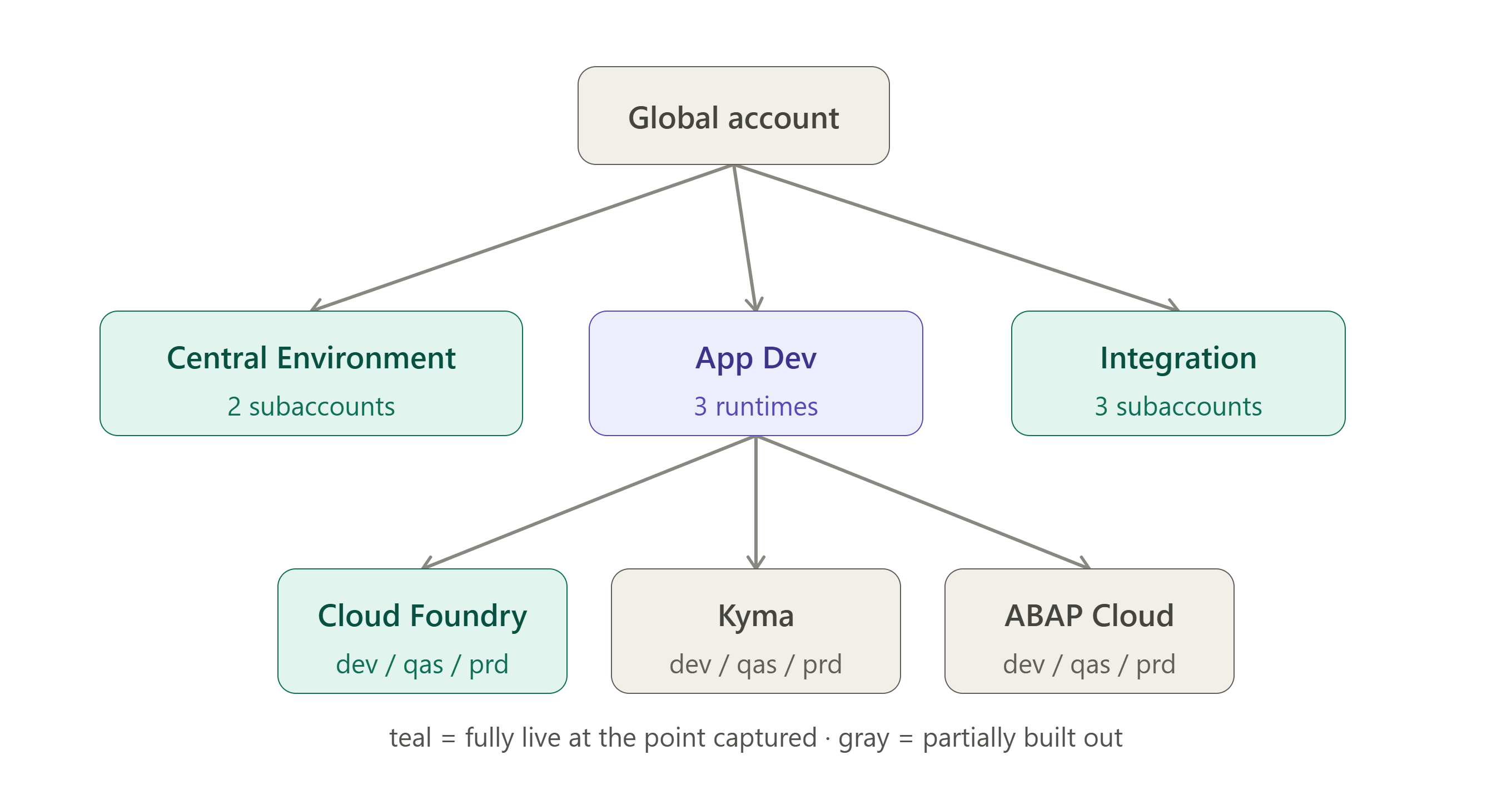
A real, complete example is worth using as this section's actual evidence. One global account splits into three top-level directories — Central Environment (shared prod/non-prod), App Dev, and Integration — with App Dev nesting one level deeper into Cloud Foundry, Kyma, and ABAP Cloud sub-directories, each holding dev/qas/prd subaccounts. Naming follows {prefix}-{category}-{runtime}-{env}, lowercase-hyphenated, under BTP's 63-character URL limit. Real services sit behind these directories too — Build Apps, Build Code, and Build Work Zone under App Dev; Integration Suite under Integration. At the point captured, 6 directories and 9 live subaccounts existed — Central Environment and Integration fully live, App Dev's three runtimes only partially built out. Designed in full, delivered in phases: the same honest story this series keeps returning to.
This structure is provisioned using the same configuration-first Terraform pattern as this series' companion AWS and Azure whitepapers [2] — a YAML configuration applied through modules built on SAP's official SAP/btp [3] and cloudfoundry/cloudfoundry [4] providers. BTP's entitlement-before-subscription ordering and its Cloud Identity Services trust dependency are both handled through Terraform's dependency graph rather than manual sequencing. A public reference implementation exists [5] for anyone who wants the actual pattern, not just the description.
One terminology note: Labels (up to 10 per entity, inherited from parent directories) [1] replaced the deprecated "custom properties" — BTP's tagging layer, a direct parallel to AWS/Azure tag policies.
Network topology
No VPC, no VNet, no hub-spoke, no firewall to design — BTP is reached over the public internet by default. The one real network-adjacent decision is the SAP Cloud Connector: a secure, encrypted, bi-directional tunnel to on-premises systems, framed the same way Parts 2–3 framed their firewall chokepoints, just outbound-initiated from the customer side.
| Service | What it does | When you need it |
|---|---|---|
| Connectivity service | Sets up actual on-premises communication (HTTP/RFC), or a channel to an on-prem-adjacent HANA database | Only when the target is genuinely on-premises |
| Destination service | Stores connection metadata for outbound calls to any remote system | Every outbound call; doesn't require Connectivity unless on-prem |
Destinations store at three levels — subaccount, service instance, or environment variable. SAP's own recommendation: avoid subaccount-level destinations (requires the broad Org Manager role) and instead use a dedicated Destination service instance in its own space — a real least-privilege pattern. Connectivity also isn't one model across the platform: general BTP, Kyma, and ABAP environment connectivity are documented separately and behave differently.
DR and resilience
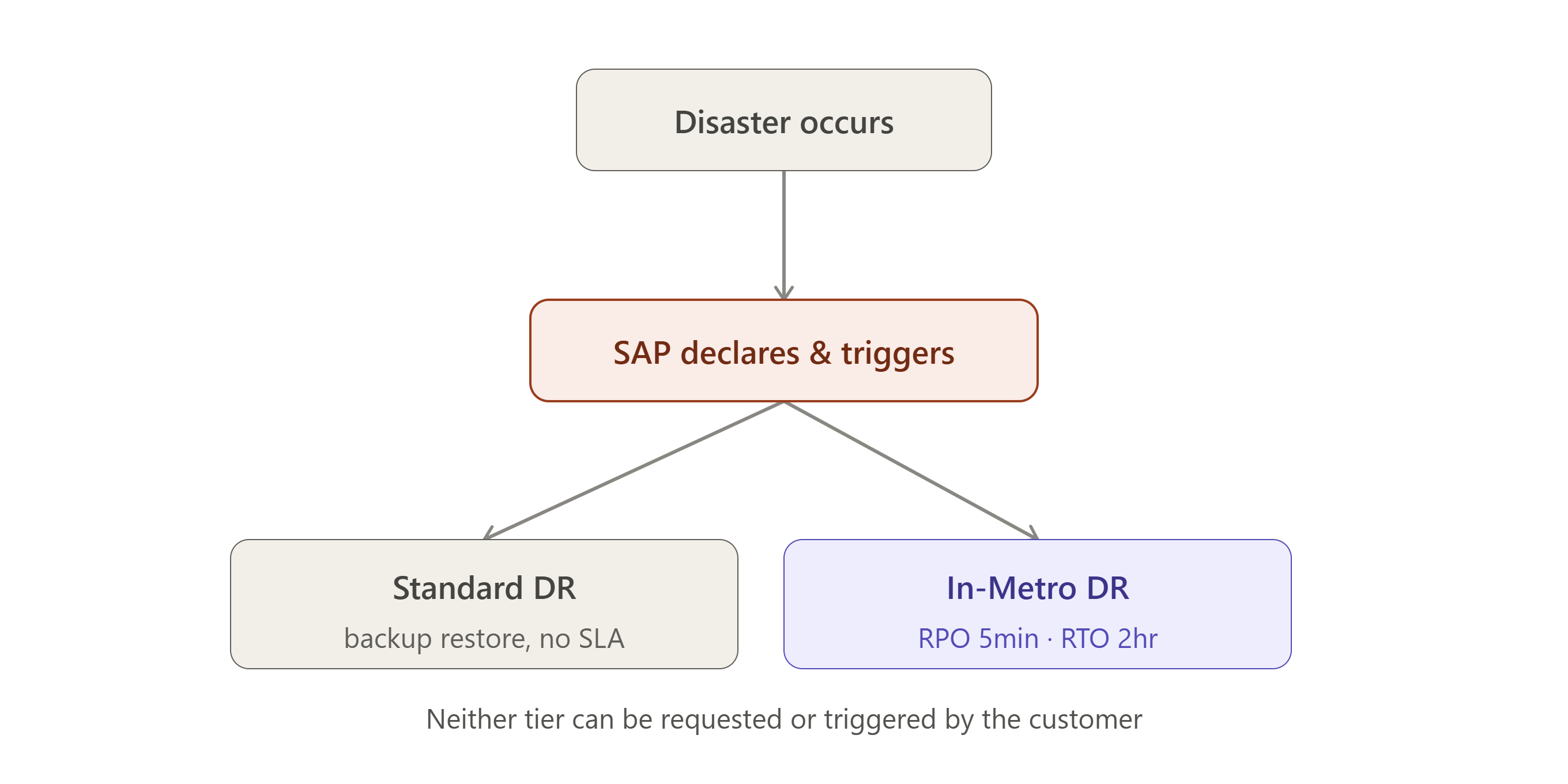
DR here is a contractual SAP commitment, not customer-designed architecture — and it's genuinely two tiers. Worth a clean distinction up front, from SAP's own materials: "High Availability is intended to handle problems while a system is running, whereas Disaster Recovery is intended to handle problems after a system fails" [6].
| Standard DR | In-Metro DR | |
|---|---|---|
| Cost | Included, no extra charge | Contractual, audited services only |
| Mechanism | Backup restore from another AZ, 14-day retention | Synchronous replication across AZs, within one region |
| SLA | None contractually — internal target is 24-hour RPO, "best commercially reasonable effort" RTO [7] [6] | RPO ≤5 min, RTO ≤2 hours [8] |
| Coverage | Every service, by default | ~37 named services (Attachment A), only on AWS or Azure |
| SAP's obligations | — | 12-monthly plan updates, annual DR test, annual SOC/ISO/FedRAMP audits |
A real SLA hierarchy sits underneath all of this, worth knowing rather than assuming a single number applies everywhere [6]: 99.7% availability is SAP's baseline promise across all SAP Cloud services generally; 99.9% is the figure amended by the Cloud Services Supplemental Terms, and it's this tier where In-Metro DR's own SLAs actually live; 99.95% is the ceiling, reserved for per-service deviations documented in the Service Description Guide.
Multi-AZ high availability is related but separate — HA keeps a service running through a localised failure; DR restores it after one. SAP runs BTP multi-AZ by default, tested through regular internal "Chaos Days" [7]: most services active/active across all AZs, data persistence active/passive across two with synchronous replication.
The correction that matters more than any number above: SAP alone declares the disaster and triggers recovery, for both tiers — customers cannot request or trigger it themselves [7]. There's no customer-side runbook step that says "declare disaster, begin failover," the way there is in Parts 2 and 3.
None of this is automatic for custom applications. Cloud Foundry Runtime needs more than one instance to qualify (SAP recommends at least three, auto-distributed across AZs); HANA Cloud needs its Replica synchronously replicating for the full month [8]. Some services get multi-AZ HA out of the box at no customer action (Identity Authentication Service, Integration Suite, Business Application Studio, Launchpad, Work Zone); others require the customer to run at least two instances themselves, with real cost implications — SAP auto-distributes replicas for HANA Cloud and Postgres, but Cloud Foundry and Kyma's extra instances are the customer's own spend [6].
(Aside: BTP's older Neo environment has separate resilience documentation and sunsets 31 December 2028 [9] — this piece's real example runs entirely on the modern environments.)
DR "design" for BTP is mostly service selection and prerequisite configuration — and even then, the trigger isn't yours to pull.
One more thing worth flagging honestly, since it's forward-looking rather than settled: SAP's own roadmap materials from June 2025 named SAP HANA Cloud multi-region DR, targeted for Q3 2025 and explicitly marked "subject to change," as the foundation for future multi-region DR scenarios more broadly [6]. Given that target has since passed, it's worth an independent check on current status before treating single-region as a permanent architectural limit rather than where things stood as of this research.
Identity and access
SAP Cloud Identity Services (CIS) is a central cloud suite from SAP for managing user identities, authentication, and access across cloud and on-premise systems.
| CIS component | Role |
|---|---|
| Identity Authentication | SSO, MFA, risk-based auth, delegation to corporate IdPs |
| Identity Provisioning | Lifecycle sync between corporate user stores and BTP roles |
| Identity Directory | Persistence layer, SCIM 2.0 API — avoids per-app user replication |
| Authorization Management Service (AMS) | Newer capability (base policies, CAP integration) — possibly a different generation from XSUAA, not a replacement; both may coexist |
Every customer gets at least two CIS tenants by default — test and production [10].
Shadow users are a real operational gotcha: BTP auto-creates a local copy of an IdP user on first login, but auto-creation is off by default, and even an auto-created shadow user starts with zero authorisations until an admin assigns role collections [11]. The platform-user/business-user split has real exceptions worth including: the ABAP environment doesn't distinguish between the two at all, and SAP Build Code and Build applications currently give developers business-user-level access, not platform-user — a genuine inconsistency, not an oversight in this piece [11]. Kyma diverges entirely — native Kubernetes RBAC, not role collections; the subaccount admin gets cluster-admin at provisioning, everything else happens via kubectl, independent of the cockpit's model.
Role Collections are the core authorisation unit, assignable to users directly or to IdP groups at scale. Custom collections come from application-defined templates via an xs-security.json descriptor — scopes (functional) and attributes (contextual).
Security baseline
The Shared Responsibility Model, confirmed from SAP's Trust Center [12], is a genuine three-way split, not the two-party AWS/Azure shape from Parts 2–3:
| Party | Owns |
|---|---|
| SAP | Security/compliance risk, applications and cloud services, infrastructure/platform configuration |
| Customer | App configuration and logs, user access, data access, app-layer threat detection |
| Public cloud provider (underneath) | Physical hardware, data centre, cloud control plane, compute/network/storage |
Neither SAP nor the customer directly manages that bottom layer. CSPM, also confirmed directly [12], sits inside SAP's own infrastructure-hardening programme — alongside centralised audit logging, encryption, VPN configuration, and vulnerability scanning — not a dashboard exposed for customer configuration.
| Detail | Specifics |
|---|---|
| TLS | 1.2 enforced minimum (1.0/1.1 unsupported); 1.3 only for Custom Domain Manager [13] |
| Audit logging | Dedicated Audit Log Retrieval API — BTP's CloudTrail/Activity Log equivalent [13] |
| Credential Store | Managed password/key repository for Cloud Foundry apps [13] |
| Malware Scanning | Named service for uploaded business documents; also DR-eligible [13] |
| Tenant isolation | "Where architectures allow," SAP separates customer tenants into separate cloud accounts [12] |
| Security Baseline Template | Official, SAP Support Portal — BTP's rough CIS Benchmark equivalent [13] |
Governance and policy-as-code
Governance here is primarily an operating-model question, not a technical enforcement engine — the sharpest difference in kind from Control Tower and Azure Policy in this series.
SAP's own Learning Journey [14] names the real pattern: a Platform Engineering Team (BTP CoE) — manages accounts, builds infrastructure, defines central guidelines, transitions into a formal CoE — paired with Cloud Development Teams running DevOps practices, sometimes as explicitly-named "Fusion Teams." SAP recommends against the traditional siloed dev/ops/support model for cloud specifically.
| Platform Engineering Team owns | |
|---|---|
| Central Knowledge Base | Documents cloud development process |
| Standardised on-boarding | For new applications |
| Application inventory | Names, repos, owning teams, dependencies |
| Security documentation templates | Data storage, classification, connectivity, auth, auditing |
| Central Service Catalog | Repetitive provisioning tasks — maps directly to Part 2's AWS Service Catalog account |
| Pre-configured, DevOps-ready accounts | Issued to Cloud Development Teams |
Delegated ownership is real too — "Account Owners" get responsibility for parts of the structure via directories [14], without full Platform Engineering Team involvement each time. Platform automation is a real, precisely citable BTP story: the account hierarchy above uses the same configuration-first Terraform pattern described in Account structure [2] [3] [4] [5] — BTP's own direct equivalent to Control Tower vending and Terraform-provisioned Azure subscriptions.
A shared-services decision framework worth carrying, not tied to specific product names:
| Centralise (no sharing needed) | Share across subaccounts | Never share |
|---|---|---|
| Automation/orchestration tooling, transport management | Credential stores, managed databases — set up once, consumed elsewhere | Notification services, job schedulers, local content agents — scoped to one space/subaccount by design |
Cost management
Most people's entry point is a Trial account [15]: free, email + phone only, 4GB memory, 10 routes/40 services max, no SLA, daily auto-stop, 90-day lifespan in 30-day increments — miss a login for 30 days and it's gone.
| Model | How it works |
|---|---|
| Consumption — CPEA / SAP BTPEA | Prepaid credits, annual commitment, overages at list price, toppable anytime |
| Consumption — Pay-As-You-Go | Zero-commit, no minimums, billed monthly in arrears |
| Subscription | Fixed cost regardless of use, 1–3 year contracts, paid upfront |
Worth flagging directly: a global account runs only one consumption model at a time — CPEA and BTPEA need separate global accounts if both are wanted; subscription can coexist with either in the same account [15]. Catalogues differ too (SAP Analytics Cloud's public system option is BTPEA-only). "Always Free" and "Free Tier" aren't the same [15] — Always Free is fully included; Free Tier is free up to a metered capacity (ABAP: runtime-hours in 16GB blocks; Build Apps: builds/tenants/functions/storage, each metered separately).
Three metering types, each clarified by SAP's own example [16]: non-elastic (Redis: fixed price per 4GB block), semi-elastic (Integration Suite: tenant cost plus included message bundles, extra in blocks), elastic (ABAP runtime: billed hourly per 16GB block on actual uptime).
Estimating cost runs through a named workflow [15]: business use case → Discovery Center → BTP Guidance Framework (decision guides, reference architectures, methodologies) → solution diagram → Service Estimator, usable without logging in. Once running, the Cost and Usage UI [16] covers usage monitoring with forecasting, cost control via label-based cross-charging and budgets, and billing verification.
One honest limitation worth stating plainly: budgets are alert-only, not enforcing [16]. SAP's own words — "the system doesn't suspend cost and service usage" past a threshold. Up to 10 budgets per global account, 3 alert thresholds, optional email or Alert Notification integration. A real contrast to any platform where a budget action can throttle spend — here, a budget is visibility, not a guardrail.
Where this series goes
Four platforms, one framework, and the honest finding underneath all of it: the seven attributes hold up everywhere, but what answers them changes completely depending on what you're actually running. AWS and Azure both gave the framework a landing zone to work with. BTP gave it something else entirely — an entitlement hierarchy, a connectivity tunnel instead of a network, a DR posture that's someone else's contractual obligation rather than your own design. The framework didn't bend to fit BTP. It revealed that "landing zone" was always shorthand for a more specific question — where do the trust boundaries actually sit, and who's really responsible for each one — and that question has a real answer on every platform, even the one that doesn't look like the others.
References
SAP Help Portal — Account Model
Das, A. — SAP BTP Infrastructure Provisioning from Configuration
Cloud Foundry — Terraform Provider for Cloud Foundry
Das, A. — sap-btp-config-example
Siemer, N. (SAP) — Dev 2 Ops: SAP BTP High Availability and Disaster Recovery Overview and Roadmap
SAP Learning — Explaining High Availability and Disaster Recovery Concepts for SAP BTP
SAP Trust Center — SAP BTP Disaster Recovery Overview (PDF)
SAP Help Portal — Resilience, High Availability, and Disaster Recovery (Neo Environment)
SAP Help Portal — Introduction to Identity and Access Management on SAP BTP
SAP Help Portal — User and Member Management
SAP Trust Center — Secure Data, Applications, and Data Centers
SAP Help Portal — SAP BTP Security
SAP Learning — Establishing a Governance Model
SAP Learning — Exploring SAP BTP Commercial Models and Estimating Costs
SAP Learning — Using Cost and Usage Management